Twitter Ads to Data Studio (formerly Looker Studio) Integration
Connect Twitter Ads to Data Studio using Coupler.io to drive instant and meaningful results out of your ad campaign performance. Use this no-code tool to collect, transform, and transfer data on the go. Benefit from pre-made dashboard templates for clear visualization.


Connect Twitter Ads to Data Studio with Coupler.io to simplify reporting

Get and prepare data effortlessly
Import data from Twitter Ads to Data Studio with Coupler.io to ensure refined ad campaign analysis. Use built-in features to organize and manage data via a unified user interface without writing any code.

Automate reporting tasks
Reduce manual intervention for your ad campaign reports with the Twitter Ads to Data Studio integration by Coupler.io. Use the scheduling options to populate your reports with data regularly, enabling actual business decisions.

Stand out as a data-driven expert
Deliver almost near real-time insights to stakeholders through the Twitter Ads to Data Studio integration. See how you can refine your ad strategies to improve the overall business performance. Use the saved time to develop innovative solutions for business.
How to integrate Twitter Ads to Data Studio (detailed guide)
Streamline your reporting by automating the Twitter Ads to Data Studio integration with Coupler.io. Send your data to Data Studio and automate data refresh on a schedule to populate your report with the most recent data. Get the latest insights into your ad campaigns with the three simple steps provided below.
Step 1: Collect Twitter Ads data
After having created the importer with the Twitter Ads as a source, set up the corresponding parameters in the form. Select the report type and period for extracting crucial data about your ad performance. Select engagement, billing, video, and other metric groups to include in your report.
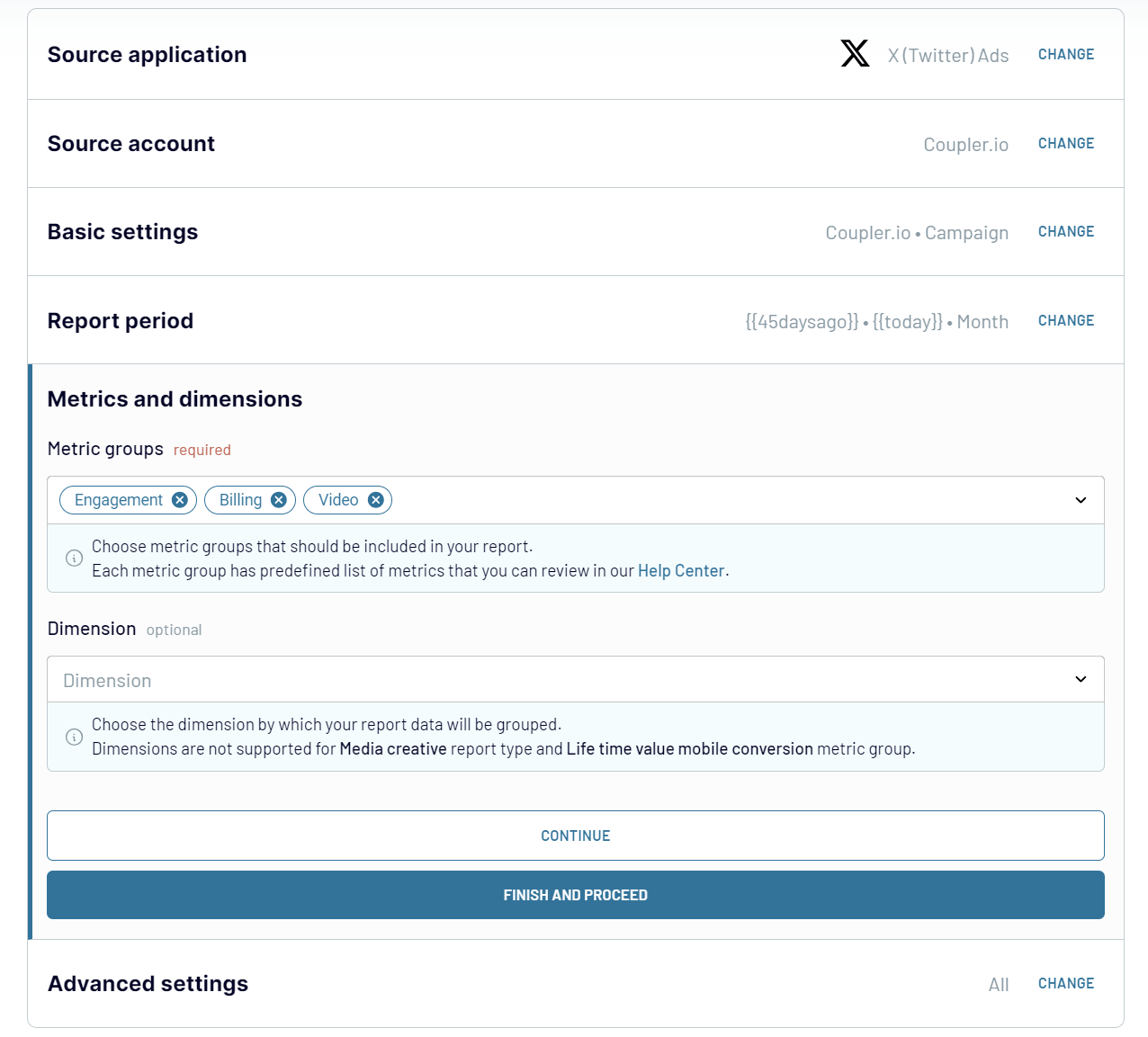
Make sure that all the source settings are in place, and proceed to the Transformation tab.
Step 2: Organize & transform data
At this point, Coupler.io displays the extracted data for preview. It is the right time and opportunity to elaborate on your datasets before you export Twitter Ads to Data Studio. Coupler.io offers a number of built-in options for elaborating on data.
Step 3: Load and schedule refresh
To import data from Twitter Ads to Data Studio, authorize the connector and generate a data source by following the in-app instructions. Once you connect your data source, click on the Create Report button.
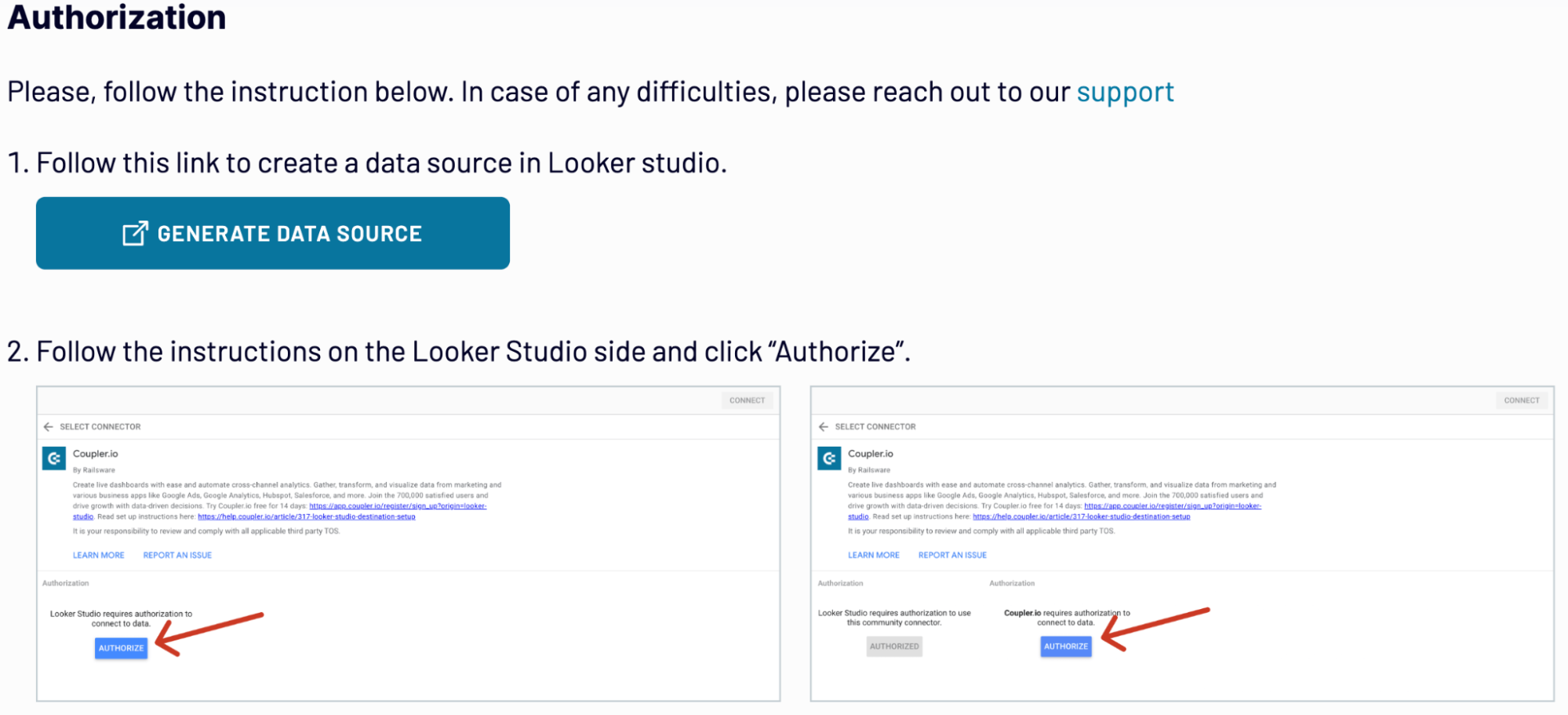
Go back to Coupler.io to set up an automated data refresh. Have a look at the settings once again, and save the importer. You can run it right away or schedule the execution for later.
Step 1: Collect Twitter Ads data
After having created the importer with the Twitter Ads as a source, set up the corresponding parameters in the form. Select the report type and period for extracting crucial data about your ad performance. Select engagement, billing, video, and other metric groups to include in your report.
Make sure that all the source settings are in place, and proceed to the Transformation tab.
Step 2: Organize & transform data
At this point, Coupler.io displays the extracted data for preview. It is the right time and opportunity to elaborate on your datasets before you export Twitter Ads to Data Studio. Coupler.io offers a number of built-in options for elaborating on data.
- Data filtering
- Data sorting
- Column hiding
- Column rearrangement
- Creation of new columns with custom metric
- Application of mathematical formulas
- Blending data from various sources
Step 3: Load and schedule refresh
To import data from Twitter Ads to Data Studio, authorize the connector and generate a data source by following the in-app instructions. Once you connect your data source, click on the Create Report button.
Go back to Coupler.io to set up an automated data refresh. Have a look at the settings once again, and save the importer. You can run it right away or schedule the execution for later.
Export Twitter Ads to Data Studio on a schedule
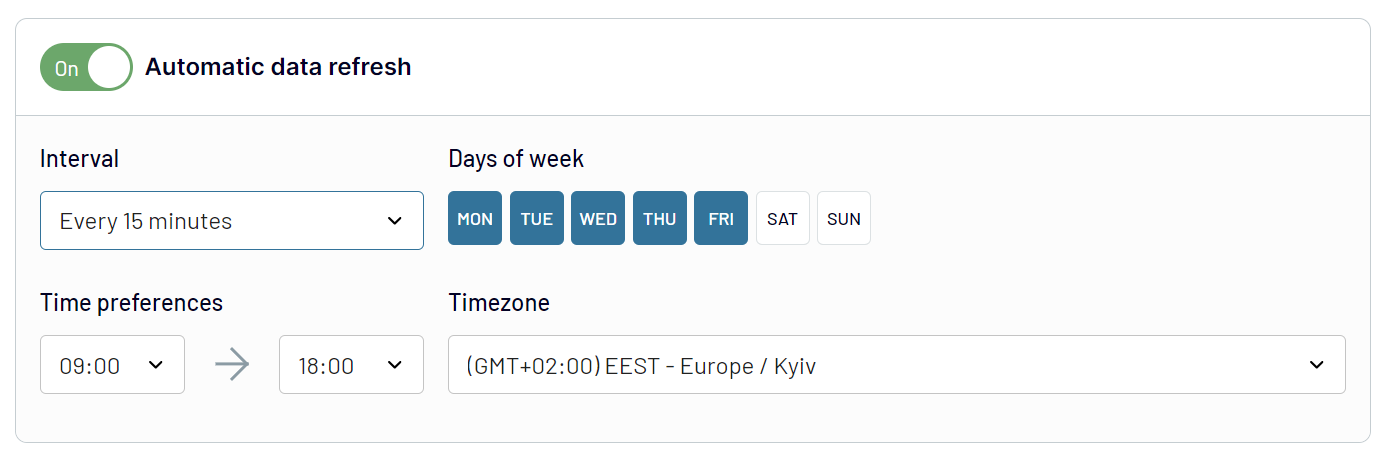
Optimize your reporting workflow with automated data collection and export on schedule. Supply your Data Studio dashboards and report with the fresh data regularly. All you have to do is activate the Automatic data refresh option in the Coupler.io importer and select the preferred interval. Thanks to this feature you can bring down the manual effort to zero. Schedule updates for every 15 minutes, 30 minutes, 1 hour, one week, or one month. Set specific days of the week and exact times for the data updates to take place. Such automation boosts the accuracy of your reports and increases the overall efficiency of analysis.
Export data from X (Twitter) Ads to alternative destinations


Quick start with PPC dashboard templates
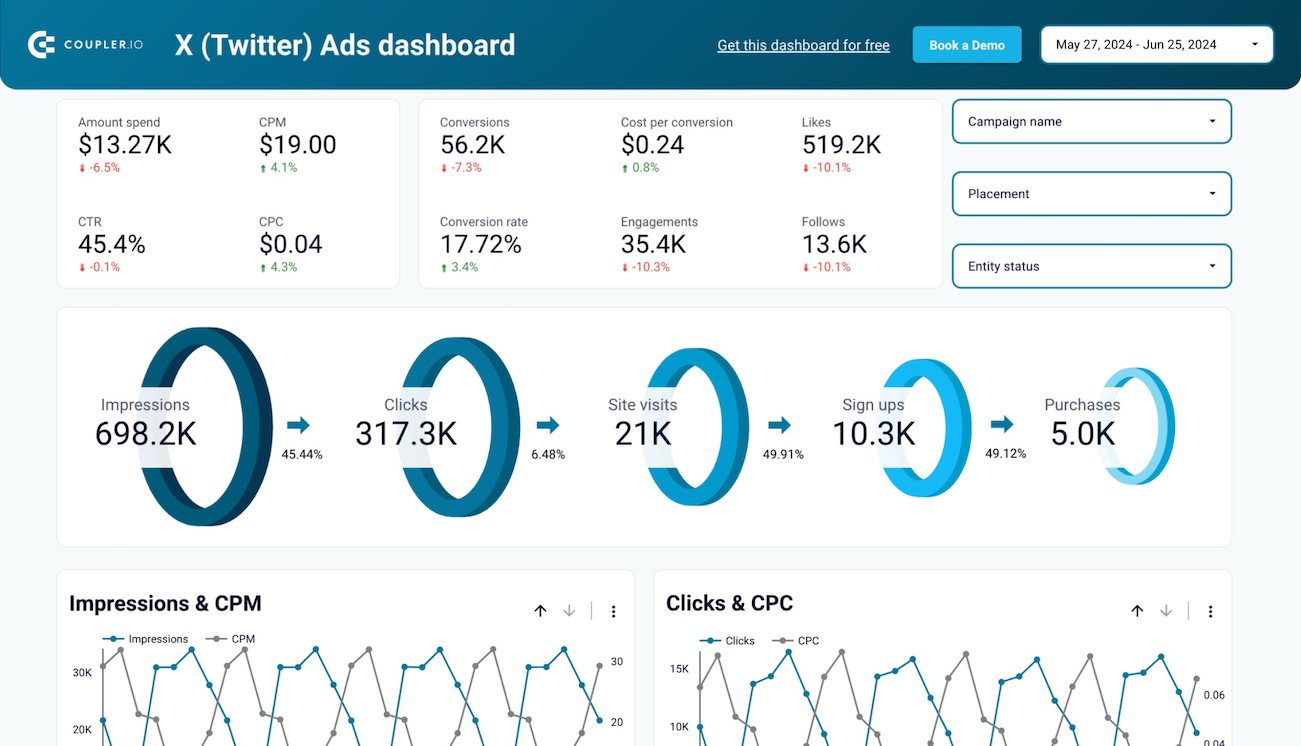
X (Twitter) Ads dashboard
 +0
+0

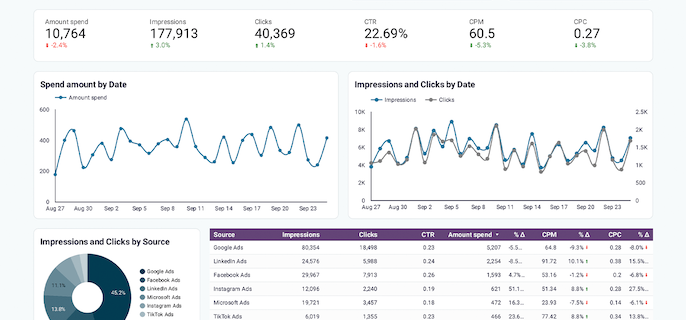
PPC multi-channel dashboard - last edition


 +1
+1
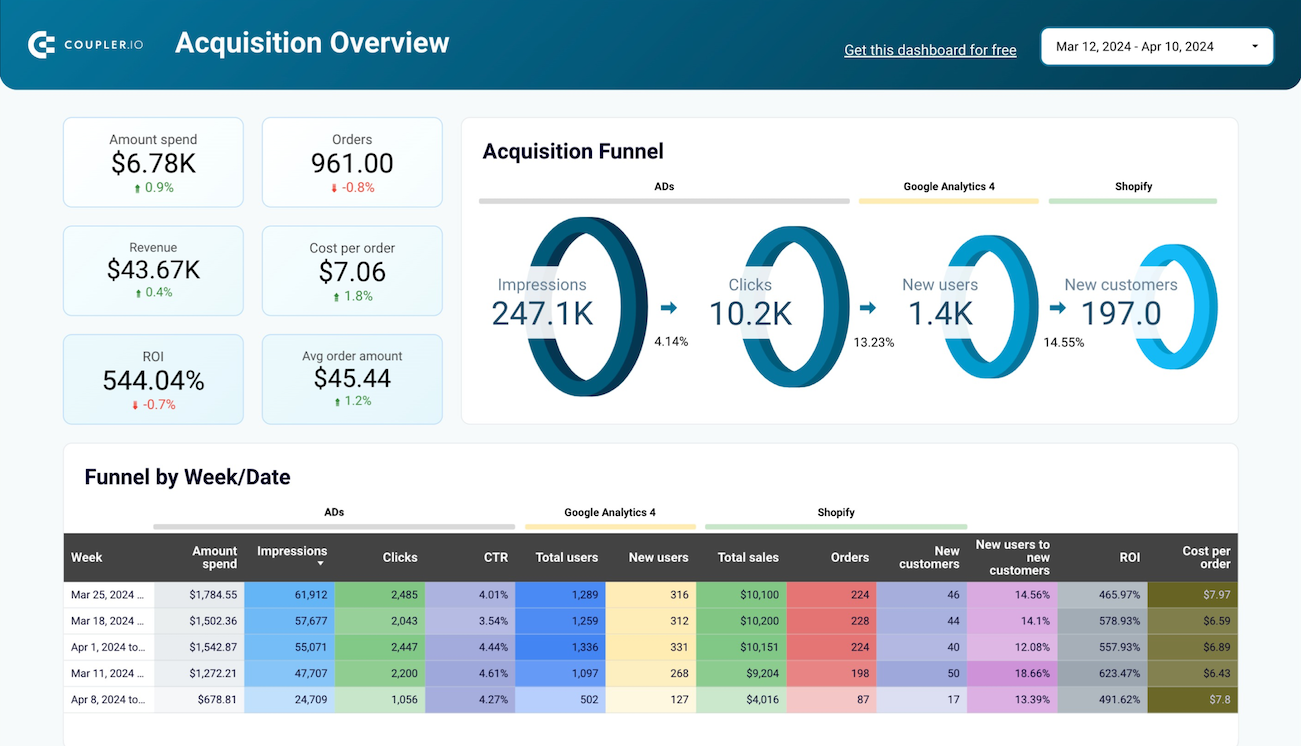
Shopify marketing funnel analytics in Looker Studio

 +4
+4
No such template is available yet.
No worries. Our team will create a template that fits your needs, just tell us more
about your case. It doesn't cost you a penny 😉
Request a custom report
about your case. It doesn't cost you a penny 😉
Export Twitter Ads to Data Studio automatically with just a few clicks.
Connect similar PPC apps and get data in minutes


What to export from Twitter Ads to Data Studio

Campaign
This data contains the campaign’s due date, allocated budget, target audience, and expected performance. Connect Twitter Ads to Data Studio to analyze your campaign data and visualize it on pre-configured dashboards. That way, you can evaluate the campaign performance and take corresponding actions.
Funding Instrument
Budget, payment methods, and limits for the campaign are key indicators of the funding instrument. Analyze this data to have a complete view of the financial resources of the particular campaign. Track and manage finance for each campaign properly to ensure the spending for it remains within budget.
Line Items
The underlined items, such components as promotional content or ads are implied. There are also performance metrics, scheduled events, and allocated resources for each campaign. Connect Twitter Ads to Data Studio to get a performance overview of each component and assess their effectiveness. These insights will help you invest your budget in the best-performing line items of an ad campaign.
Media Creative
This data includes information on the visual and textual content of your ads. Analyze this data to get a better overview of how media components perform within ad campaigns. Based on the obtained insights, you can decide which media items perform better and use them in your ads more often.
Promoted Account
This data provides details about the performance of advertised Twitter accounts. Analyze engagement rates, follower growth, and audience demographics to explore the promotional campaign. Assess the success of the promoted account and see how you can improve account visibility further.
Account
Billing information, account settings, and performance metrics make up the Twitter account data. Import this data from Twitter Ads to Data Studio to evaluate your account’s liveliness and activity. Discover how you can adjust your account and improve advertising strategies for it.
Promoted Tweet
This data contains the performance details of the boosted tweets aimed to reach a larger audience. Impressions, retweets, likes, and clicks make up the promoted tweet data. Analyze this data to evaluate the effectiveness of your content strategy. Use the obtained insights for planning future promotions for your Twitter account.
How do you connect Twitter Ads to Data Studio?
Step 1. Connect your Twitter Ads account and choose the type of data to export
30 seconds
Step 2. Organize and transform data before loading it into Data Studio
30 seconds
Step 3. Authorize the connector and import data by following the in-app instructions
30 seconds
Step 4. Schedule auto-refreshes to export Twitter Ads to Data Studio at desired intervals
10 seconds
Pricing plans
- Monthly
- Annual (save 25%)
Your data is secured by industry standards
 Google Cloud
Certified
 SOC 2 Type II
Certified
 GDPR
GDPRCompliant
 HIPAA
HIPAACompliant
Don’t just take our word for it





Dramatically improved our reporting speed by about 60%. The interface is user-friendly, even for team members with no technical background.
Helped solve data processing issues, and customer service is 10/10. It is extremely easy to use, and allows us to extract data from multiple sources.